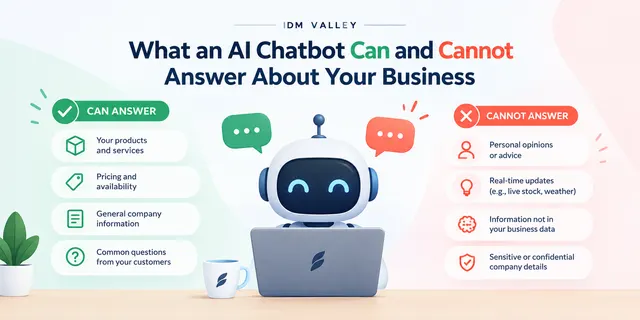
Before an AI chatbot can answer accurately from your website, your website has to be right. The chatbot doesn't know your business. It reads the pages and documents you give it and builds answers from them. If those pages are outdated, contradict each other or skip the things customers ask about, the chatbot will repeat those problems politely and confidently to every visitor.
So the preparation work is mostly content work, not technical work. Decide which pages and documents the bot is allowed to use. Fix every stale price and policy. Collect the real questions your customers ask. Then test the bot against those questions before anyone outside your team sees it. Skip any of these and you'll spend the first month after launch apologising for wrong answers.
The pages and documents the chatbot will answer from
Most website chatbots work by retrieval. When a visitor asks something, the system searches your content for the most relevant passages and has the language model write an answer from them. That means the quality of the answer depends on what's in the pile it searches. Start by listing what goes into that pile:
- Service or product pages: what you sell, who it's for, what's included and what isn't.
- Pricing pages or rate cards, if you publish prices. If you don't, the bot needs a clear line telling it what to say instead.
- Policies: refunds, cancellations, delivery areas, warranty, payment terms, GST invoicing.
- FAQs, if you already have them, though most need rewriting (more on that below).
- Contact and location details: branch addresses, working hours, holiday closures, which number handles what.
- Supporting documents: brochures, spec sheets, onboarding guides, installation manuals.
Just as important is what you leave out. Old blog posts announcing a 2021 offer, archived event pages, a careers page for a role you filled years ago, internal PDFs that were never meant for customers: all of these can surface in answers. We usually recommend an explicit allow-list rather than letting the bot crawl the whole domain.
Check the format too. A scanned brochure saved as an image-only PDF is close to unreadable for most systems. Prices shown inside a JPG banner won't be picked up. Content that only appears after a click in a JavaScript tab may be missed by the crawler. If a fact matters, it should exist as plain text somewhere the bot can read.
The amount and state of this content also affects how much setup work the project needs, which is one reason quotes vary so much. If you're wondering what an AI chatbot for a website costs, the cleanup described here is part of that picture.
Fix outdated prices and policies before anything else
A human sales executive knows the website price is from last year and quotes the new one. A chatbot doesn't. It treats whatever it finds as true, and if it finds two versions it may pick either one or blend them.
This is where most problems come from. A common pattern: the pricing page was updated, but an older service page, a blog post and a downloadable PDF still show the previous rate. Or the refund policy changed from seven days to no refunds on custom orders, but the FAQ still says seven days. The bot then quotes the wrong figure to a customer who screenshots it, and now you're arguing with your own website.
Go through your site and do three things:
- Find every place a price, timeline or policy term appears. Search your CMS for rupee symbols, "days", "refund", "warranty" and "delivery". You'll find more instances than you expect.
- Pick one source of truth for each. One pricing page, one refund policy page. Other pages should link to them rather than restate the details.
- Remove or update the rest. Unpublish old offers. Replace outdated PDFs. If a page has to stay for SEO reasons, edit the stale details out of it.
If your prices change often or depend heavily on the job, it's usually better that the bot doesn't quote figures at all. Give it a clear instruction: explain what affects the price and offer to connect the visitor with someone. That's a safer answer than a confident wrong number.
Collect the questions customers actually ask
Your website was written to describe your business the way you see it. Customers ask questions the way they see it. Those are often different, and the gap is exactly where chatbots fail.
Pull real questions from the places they already arrive:
- WhatsApp Business chats and your sales team's personal WhatsApp
- Website contact form submissions and enquiry emails
- Call notes, or ask whoever answers the phone to jot down questions for two weeks
- Google Business Profile questions and reviews
- Lead platforms like IndiaMART or JustDial, if you use them
Group what you find. You'll typically see repeated questions about delivery to specific cities, minimum order quantities, whether you do site visits, EMI options, turnaround times and how you compare with a cheaper competitor. Notice how people phrase them, including Hinglish and spelling mistakes, because visitors will type the same way to the bot.
Then check each question against your content. If the honest answer exists on your site in plain words, good. If it doesn't, write it, either on the relevant service page or in a proper FAQ. If it's something you don't want answered publicly, such as discounts for bulk orders, decide what the bot should say and write that down as an instruction.
Test the chatbot's answers before it goes live
Don't test by asking it five friendly questions and declaring it ready. Build a written test set from the questions you collected and run every one of them. Include:
- Straightforward questions the site clearly answers. These should be right every time.
- Questions your site doesn't answer. The correct behaviour is to say it doesn't know and offer a handover, not to guess.
- Price and policy questions, phrased several ways. Check the figure against your source of truth, not your memory.
- Awkward ones: "Can I get a discount?", "Why are you more expensive than X?", "Is this safe for my child?", a complaint about a late order.
- Off-topic or mischievous prompts, like asking it to write a poem or ignore its instructions.
- Hindi, Hinglish and misspelled versions of common questions.
Keep a simple sheet with the question, the bot's answer, whether it was correct, and what needs fixing. Most fixes will be content fixes, not settings changes. When the bot gets something wrong, ask which page it pulled from. Many systems show their sources, and the source is usually the real culprit.
Get someone from sales or support to do a round of testing too. They'll spot wrong answers that a developer won't. And agree who owns retesting: every time you change prices or policies, rerun the relevant questions.
Practical advice before you commit
If your site has only a handful of pages and most enquiries come in on WhatsApp, a well-written FAQ page and a WhatsApp click-to-chat button may serve you better than an AI chatbot for now. It's cheaper, and nothing can go wrong with an answer you wrote yourself.
If your prices or availability change weekly and nobody updates the website, fix that habit first. A chatbot will expose the problem faster than anything else.
An AI chatbot earns its place when you get a steady volume of repeat questions, your content is accurate and kept current, and someone on your team will review conversations every week. If that sounds like you, the preparation above is most of the work. If you want a rough idea of scope, try the pricing calculator or contact us.