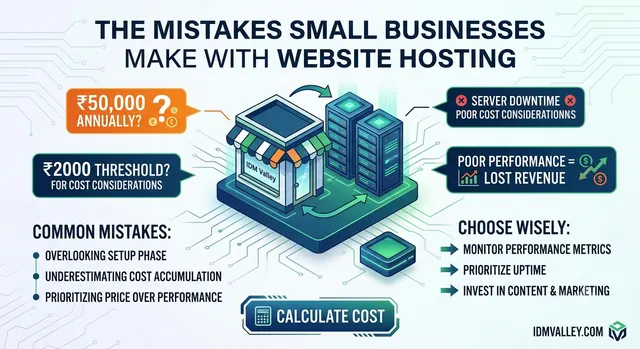
Most hosting problems in small Indian businesses aren't caused by a bad hosting company. They come from a handful of avoidable mistakes: the domain or hosting account registered in someone else's name, no backup stored off the server, a cheap plan that gets much more expensive at renewal, and email running on the same server as the website. Fix those four and most sites run without trouble on fairly ordinary hosting.
If your site is a brochure site with a contact form and a few hundred visitors a month, you don't need a VPS, a cloud setup or "enterprise" hosting yet. A decent shared or managed plan, set up properly, is enough. Spend more only when you have a specific reason, and the sections below cover what those reasons look like.
The mistakes we see most often
These come up again and again when businesses come to us after something has broken:
- The account isn't yours. A freelancer or previous agency registered the domain and hosting under their own email. When they stop replying, you can't renew, move or even log in. Check this today: the domain registrar account and the hosting account should both be in your company's name, with an email address you control.
- Backups live on the same server. Many plans advertise "daily backups", but if those copies sit on the same machine, a server failure or a hack takes them out too. You need at least one copy somewhere else, such as Google Drive, Amazon S3 or your own storage.
- Renewal shock. Introductory prices for the first term are common, and the renewal rate is often noticeably higher. Read the renewal price before you buy, not after.
- Email on shared hosting. Business email running on a cheap shared server tends to land in spam, especially if another site on that server sends junk. Google Workspace or Zoho Mail, with SPF, DKIM and DMARC records set up, solves this, and it means your email keeps working if the website goes down.
- Nobody updates anything. An old WordPress install with outdated plugins and an old PHP version is the usual way sites get hacked. That's a maintenance problem, but it gets blamed on hosting.
- Server far from your customers. If your buyers are in India and your server is in the US, every page load has to travel further. Choose a data centre in India (Mumbai, Bangalore, Hyderabad and others are available from the major providers) or put a CDN like Cloudflare in front of the site.
When paying for better hosting is genuinely worth it
Upgrading from basic shared hosting to a VPS, managed WordPress hosting or a cloud server makes sense in a few clear situations:
- You take payments or orders online. If downtime means lost sales, you want isolated resources, proper monitoring and someone who responds quickly when something fails.
- Your traffic has spikes. A festive sale, a TV mention or a paid campaign can overwhelm a shared plan. If you run campaigns that send a lot of people to the site at once, plan the hosting around the peak, not the average.
- You run custom software. A Laravel or Node app, a CRM, or a portal with logins and a database usually needs a server you can configure. Shared hosting often won't allow the software versions or background jobs you need.
- You have compliance or data obligations. If you handle customer personal data and want it stored in India under your control, a properly configured cloud server with access logs is easier to justify than a shared account.
- Your server response time is measurably slow. If testing shows the server itself is the bottleneck (more on how to check below), better hosting will help directly.
If none of these apply, a well-chosen shared or managed plan is the right call. Moving a five-page site to a cloud server mostly buys you more things to maintain.
What hosting does not fix
Businesses often upgrade hosting expecting a problem to disappear, and it doesn't. Hosting won't fix:
- A slow site caused by the site itself. Uncompressed 4 MB banner images, a page builder loading dozens of scripts, or a slider nobody uses will stay slow on any server. Most slow sites we audit have a front-end problem, not a server problem.
- Low enquiries. Faster hosting doesn't create demand. If people aren't contacting you, the issue is usually the offer, the content, the search visibility or the contact form.
- Poor Google rankings. Server speed is a small part of page experience. Content, relevance and links matter far more.
- Security on its own. A good host blocks some attacks, but outdated plugins, weak admin passwords and shared logins will still get you hacked.
- Missing backups or ownership. No host can restore what was never backed up, or give you control of an account in someone else's name.
How to tell whether your hosting is working
You don't need technical skills to check this. Use these:
- Uptime monitoring. Set up a free monitor such as UptimeRobot to check your site every few minutes and email you if it goes down. After a month you'll have real data instead of a feeling.
- Server response time. Run your site through PageSpeed Insights and look at Time to First Byte. Google's guidance treats a TTFB of 0.8 seconds or less as good. If it's consistently well above that, the server or the site's backend is the problem.
- Core Web Vitals. In the same report, check LCP (good is 2.5 seconds or less), INP (good is 200 milliseconds or less; it replaced FID in March 2024) and CLS (good is 0.1 or less). Poor LCP with good TTFB usually points to images and scripts, not hosting.
- A backup restore test. Once, ask your developer to restore a backup to a test location. A backup you've never restored is an assumption, not a backup.
- Support response. Raise a simple ticket and note how long it takes and whether the answer is useful. You'll want to know this before an emergency, not during one.
- SSL and renewal dates. Make sure the certificate renews automatically and the domain is on auto-renew, with a card that won't expire next month.
Realistic timelines and effort
Setting up new hosting for a simple site is quick. Buying a plan, pointing the domain and installing SSL can be done in an afternoon if the DNS access is in your hands.
Migrating an existing site takes longer, mostly because of preparation. Someone has to take a full backup, move files and database, test the copy on the new server, then switch DNS. DNS changes can take up to a day or two to reach everyone, so plan the switch for a quiet day and keep the old hosting active until you've confirmed everything works, including forms and email.
The slow part is usually access. If credentials are scattered across an old developer, an IT person and someone's personal Gmail, recovering them can take longer than the migration itself.
Ongoing effort is small but real: plugin and core updates, checking backups, watching renewal dates. For a basic site that's a short monthly check. For a store or custom app it's regular work that someone should own by name.
Honest advice before you pay for anything
- First, get ownership sorted. Domain and hosting in your name, credentials stored somewhere safe. This costs nothing and prevents the worst outcomes.
- Move email to Google Workspace or Zoho Mail before upgrading hosting. It often solves the problem people were actually complaining about.
- For a brochure site, a reputable shared or managed plan with an Indian data centre or Cloudflare in front is the right choice. Don't let anyone sell you a cloud server you'll never use.
- Upgrade when your monitoring shows real downtime or slow server response, or when you're taking orders and payments. Not before.
- Compare renewal prices, not first-year prices, and remember GST at 18% applies to hosting invoices.
- Fix images and bloated plugins before blaming the server.
If you want a rough idea of what hosting and maintenance would cost for your setup, try the pricing calculator.